
Description
The IPS-UVC OS500 is a cutting-edge device designed to meet the needs of professionals seeking advanced imaging solutions. This manual, now in its version 1.1, reflects the latest updates and enhancements, including an improved graphical user interface and the addition of a camera selector feature. The manual provides comprehensive guidance on utilizing the device to its full potential, ensuring users can maximize their productivity and achieve superior results.
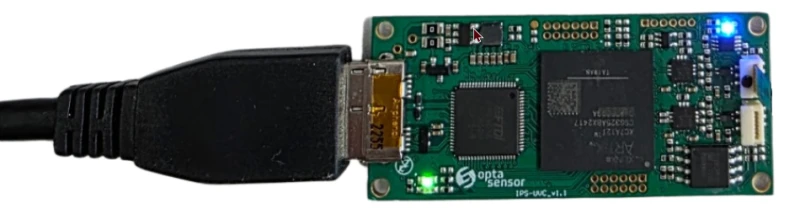
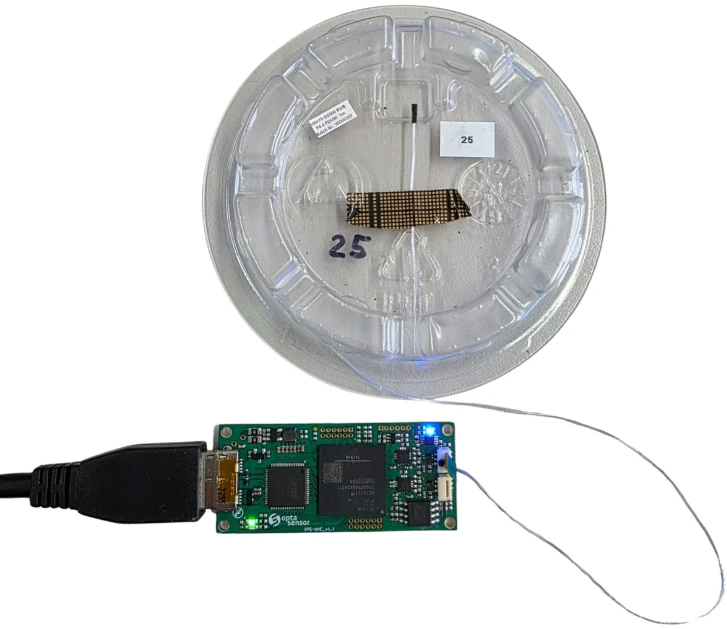
IPS-UVC is a system from OptaSensor that provides an interface between micro cameras and a PC via USB3.Based on an FPGA chipset with reconfigurable capabilities and powerful resources, its flexible architecture is best suited for micro camera test and evaluation. This system provides an easy interface to all camera features and illumination driving capabilities when micro cameras are equipped with light sources.
The manual is structured to facilitate ease of use, with a clear and concise layout that guides users through the various features and settings of the IPS-UVC OS500 LED. From sensor register access to image processing, each section is designed to provide users with the knowledge they need to operate the device efficiently. Whether you are a seasoned professional or a newcomer to the field, this manual is an invaluable tool that will enhance your experience with the IPS-UVC OS500 LED.
NOTE: Camera with FOV90 and F4.0 is included in the IPS-UVC OS500.
IPS-UVC OS500 Micro Camera Interface USB Card
Specifications
| Accessory Type: | Hardware, Camera Interface Card |
|---|---|
| Version: | 1.1 |
| Chipset Basis: | FPGA |
| Included Camera: | FOV90, F4.0 |
| Manufacturer Part Number (MPN): | IPS-UVC OS500 |
| FindLight SKU: | FL-24282 |
Got questions about specs? Use the inquiry form to ask.
 Download Data Sheet

Features
- Advanced GUI Features: The IPS-UVC OS500 LED Manual Version 1.1 introduces an updated graphical user interface, enhancing user interaction and experience.
- Camera Selector: Easily switch between different camera inputs with the new camera selector feature, providing flexibility and convenience.
- Image Zoom: Utilize the mouse wheel for intuitive image zooming, allowing for detailed examination and analysis.
- OptaSensor UVC Viewer: Access sensor registers seamlessly and manage recording options efficiently with the OptaSensor UVC Viewer.
- Brightness Control: Adjust brightness settings to achieve optimal image clarity and visibility under various lighting conditions.
- White Balance Adjustment: Ensure accurate color representation with easy-to-use white balance controls.
- Dark Field Imaging: Capture high-contrast images with the dark field feature, ideal for specific imaging requirements.
- Pixel Response Optimization: Fine-tune pixel response for enhanced image quality and performance.
- Comprehensive Image Processing: Leverage advanced image processing capabilities for superior image output and analysis.
- Troubleshooting Guide: Access a detailed troubleshooting section to resolve common software crashes and system responsiveness issues efficiently.
Applications
- Overview: The IPS-UVC OS500 LED is a sophisticated device designed for optimal performance in various applications.
- Getting Started: Easy setup and user-friendly interface to ensure quick deployment and operation.
- OptaSensor UVC Viewer: Advanced viewing capabilities with multiple features to enhance user experience.
- Sensor Register Access: Provides detailed access to sensor registers for precise control and customization.
- Recording Options: Flexible recording settings to capture high-quality images and videos.
- Brightness Control: Adjustable brightness settings to suit different lighting conditions.
- White Balance: Automatic and manual white balance options for accurate color representation.
- Dark Field: Specialized mode for capturing images in low-light environments.
- Pixel Response: Fast and responsive pixel performance for high-resolution imaging.
- Image Processing: Advanced processing capabilities to enhance image quality and detail.
- Troubleshooting: Comprehensive guide to resolve common issues and ensure smooth operation.
Export & Trade Information
| ECCN: | EAR99 |
|---|---|
| HTS Code: | 9007.91.4000 |
| Estimated US Tariff: | 0% |
Frequently Asked Questions
What is the IPS-UVC OS500 LED?
What is new in version 1.1 of the IPS-UVC OS500 LED manual?
What are some of the features of the OptaSensor UVC Viewer?
How can I troubleshoot software crashes or system unresponsiveness?
What is the purpose of the brightness control feature?
What should I do if images have different colors horizontally?
Got more questions? Use the RFQ form to ask the supplier directly.
Need pricing for this product? Send a quick inquiry
Your inquiry has been received.
Create an account by adding a password
Why create an account?
- Auto-complete inquiry forms
- View and manage all your past messages
- Save products to your favorites
- Close your account anytime — no hassle